How to Register .np Domain for your Personal use
Growing your personal online presence can be a tough task to do!
Specially when you want to show online presence outside of social media.
The best thing an individual can do to show his/her online presence is to create a personal website.
This can be a very challenging task for most of the individual.
Here I am about to guide you on registering your personal .np domain.
Things to know before registering your personal domain:
- You can only register the domain name of your name.
You can buy .np domains like you buy any other top-level domains. Below are some steps to follow to register the new .np domain for your personal use.
- Before you go out and register your new domain name you should have a web hosting space from any web hosting service provider or you can get it from me too. You will need Name Server and IP while registering your new domain.
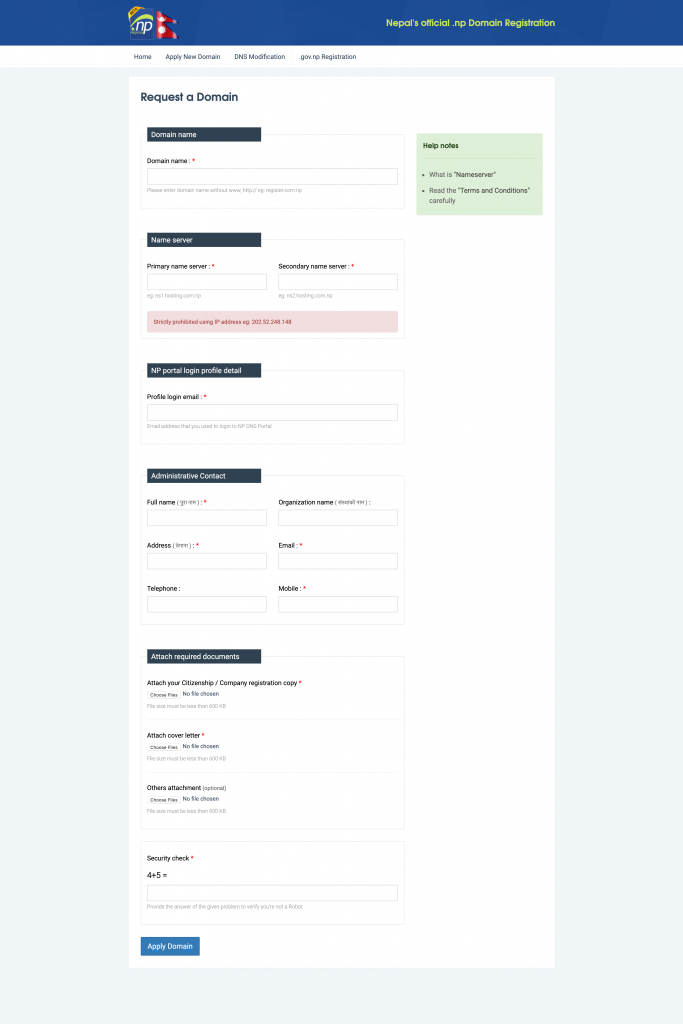
- Go to https://register.com.np, you will see a button saying “Apply New Domain“, Click the button.
- As shown below, the form will appear you simply need to fill in the form with your details.
- Now before filling out the form, you need to prepare some official documents like “Citizenship & Cover letter explaining why you need this domain name” (You can get a sample of the cover letter below this post).
- Now you can start filling up the form and attach the necessary documents and send them.
- You will be asked to create an account. Create an account with them with your email address and a strong password.
- Now your new domain registration will be processed and you will be notified via email.
- If your new domain is approved then you will get an email and you can use it as usual.
“If you are planning to create a website, let me know. I will be more than happy to help you out”
Shisham Chudal